Annotation Toolkit
The GitHub Annotation Toolkit is a Figma asset library packed with components to help you organize your design canvas, diagram UI anatomy, and annotate accessibility details for web and mobile experiences.
Whether you're a designer, developer, or product manager, this toolkit meets you where you are—you don't need to be an accessibility expert. It's flexible enough to document broad accessibility considerations or dig into the fine details of complex components.
The Annotation Toolkit provides a complete solution for annotating accessibility considerations in Figma designs. Developed from our internal accessibility work, this toolkit fills a critical gap in the design-to-development workflow where important details often get lost.
Features include:
- Flow lines and canvas utilities: Organize and label your frames and flows. Convey important details for design status, scope, transitions, interactions, validation states, and focus management.
- User interactions: Keyboard shortcuts and a complete range of basic, specialized, and advanced touch gestures, mouse actions, device settings, and platform functions.
- Page structure and landmarks: Create a content outline and make semantic heading levels and landmark regions clear.
- Lists and tables: Group related items to show clear contextual relationships and outline table structure for more complex data presented with rows and columns.
- Media: Describe informative and decorative images. You can also embed video and audio.
- Buttons and links: Clearly label controls that perform actions on a page and those that navigate elsewhere.
- Form elements: Fill out the hidden semantics of all form fields and controls that accept data input from users.
- Ordering: Outline the focus order to support keyboard navigation (using tab or arrow keys) as well as any reading order that differs from what is shown.
- Metadata: Document titles and language annotations to support better SEO and localization.
- System feedback: Highlight important information, potential issues or errors, successful actions, and live region announcements.
- Interface guidelines: Diagram component anatomy for guidelines and prototypes.
- Primer A11y Presets: Bespoke annotations for GitHub's design system components which may be instructive for building preset annotations for other design systems.
- Accessibility checklists: Interactive lists for designers and engineers to track the progress of a design as teams address key WCAG guidelines and ensure best practices are accounted for early.
Additionally, the library supports iOS and Android platforms, allowing you to create accessible mobile apps through clear, structured notes for native elements and screen reader announcements.
We would love your feedback and contributions to help improve the Annotation Toolkit, including any examples of how you’ve used or customized this library.
Download the Toolkit

Requirements
A paid Figma plan is recommended in order to use the components as an asset library.
This library file uses the Mona Sans and San Francisco font families.
The components in this library support web as well as mobile (iOS and Android) platforms.
How to use the Annotation Toolkit library in your design files
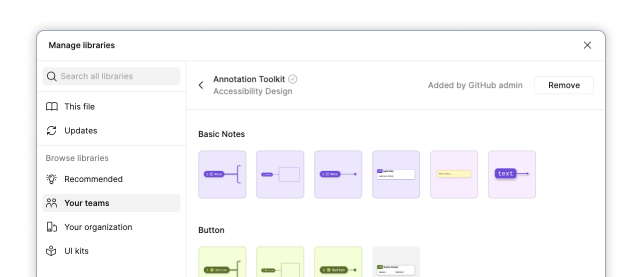
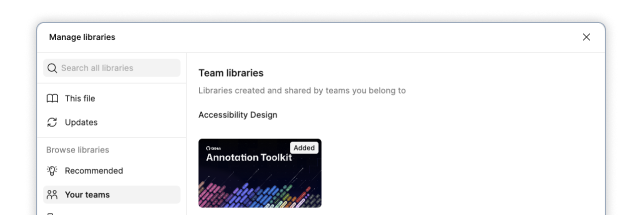
If not already available in your list of libraries, Publish and enable from the Assets tab.
For GitHub staff, the "Annotation Toolkit" is enabled in the Figma Asset panel by default. For older files, GitHub staff can enable the library by following these instructions (Internal only).
 |
|---|
| Publish to your Figma instance and add to your file. |
 |
|---|
| The Annotation Toolkit is now available to use in your work! |
Resources
Design system annotations (GitHub Blog series)
The Accessibility Design team created a set of annotations to bridge the gaps that design systems alone can’t fix and proactively addresses accessibility issues within Primer components.
- Part 1: How accessibility gets left out of components
- Part 2: Advanced methods of annotating components
More from the GitHub Blog
- Level up design-to-code collaboration with GitHub’s open source Annotation Toolkit
- How we’re building more inclusive and accessible components at GitHub by @ericwbailey
Further reading
- Accessibility annotation kits only annotate by @ericwbailey
- Annotating Designs using Common Language by Craig Abbott
- Auditing Design Systems for Accessibility by Anna E. Cook
- The value of accessibility annotations in inclusive design by Antonio Matera
- A Designer’s Guide to Documenting Accessibility & User Interactions by Stéphanie Walter
Learn more
If you're new to annotations, start with Getting started. For deep dives, best practices, and implementation strategies, browse Training and deep dives and the Tutorials.
Support
This project uses GitHub issues to track bugs and feature requests. Please search the existing issues before filing new issues to avoid duplicates. To get help, submit bugs, ask questions, or make feature requests, create an Issue in this repository. The Annotation Toolkit is under active development and maintained by GitHub staff. We will do our best to respond to support, feature requests, and community questions in a timely manner.
Note
Support for GitHub staff (Internal only)
- Ask quick accessibility questions in #accessibility
- Ask Annotation Toolkit questions in #annotation-toolkit
- Request an Accessibility Design pairing session for complex interactions or unfamiliar patterns
- Submit an Accessibility Office Hours request for focused design and implementation feedback
- Watch the historical Design Checklist video series
- Read the Accessibility Design guide
Maintainers
- @janmaarten-a11y, Senior Accessibility Designer & Project Lead
- @mattobee, Staff Accessibility Designer
Contributors
Special thanks to the following legends for their early feedback and help improving this library.
- Alexis Lucio
- Eric Bailey
- Chelsea Adelman
- Joe Lamyman
- Demelza Feltham
- Julian Kittelson-Aldred
- Devin Owsley
- David Cox
- Jasmine Friedrich
- Daniel Henderson-Ede
- Kevin Oliveira
Acknowledgement
The GitHub Annotation Toolkit is a fork of the CVS Health Inclusive Design team’s Web Accessibility Annotation Kit (CC-BY 4.0). User interaction annotations were created using modified open source icons by Jordan Stephensen and Yogi Aprellianto (CC-BY 4.0).
License
This project is licensed under the terms of the CC-BY 4.0 license. Please refer to the LICENSE file for the full terms. When using the GitHub logos, be sure to follow the GitHub logo guidelines.